UTM parameters lost after a redirect: find the first broken hop
A tagged ad link can reach the right presell while a redirect changes its campaign fields. Trace a harmless test value through the route, then check measurement separately. A visible tag is not proof that a session or purchase was attributed.

On this page 8 sections
- What does a missing UTM actually tell you?
- How do you find the first hop that changes?
- Where should the investigation begin?
- What changes across two domains?
- Which URL is the campaign really using?
- How do you test without mistaking a route for a result?
- When is the issue ready to hand back?
- A retained UTM label does not prove continuity across the handoff
What does a missing UTM actually tell you?
A missing campaign parameter tells you that a particular address does not contain that value. It does not, by itself, identify the cause or establish what a measurement system recorded earlier in the journey. Separate the browser route from the reporting system before changing either.
Campaign parameters are ordinary query-string fields. A reader might enter a presell via a tagged link, follow a button to a store, and then continue to a checkout. Those are distinct requests and may cross domains. A later address need not repeat every field for an earlier page to have received it.
Google explains that campaign values are case-sensitive: utm_source=sample and utm_source=Sample are different values.1 Use controlled, nonpersonal placeholders when testing. Never include a customer's name, email address, payment details or a real click identifier in a shared test log.
| Observation | What it establishes | What remains unknown |
|---|---|---|
| Value present in starting link | The test link contains it | Whether the first page receives it |
| Value missing after a redirect | That destination address lacks it | Whether an earlier system collected it |
| Value present at the presell | The browser reached a tagged address | Whether a measurement event was sent or accepted |
| Product page has no UTM | Its address lacks that field | Whether the session continues across domains |
How do you find the first hop that changes?
Start with the exact destination your campaign is configured to use, then run a separate test with unmistakable dummy values. Keep its scheme, hostname, path and existing query fields intact. Add fields using ? only when the address has no query string, and & for additional fields.
For a fictional example, https://example.com/guide?utm_source=test-source&utm_medium=test-medium&utm_campaign=test-campaign contains three test labels. They describe no real visitor or campaign. Replace the host with a route you are authorized to test; never publish the example as a live offer.
Record the first address, each server redirect destination, the final presell address and the address after the intended product button. Network inspection can show a redirect too quick to read in the address bar. A script or market selector can also navigate after the server returns a page, so an HTTP-only trace is useful but incomplete. Test the route in the browser as well.
Checklist
6 items
Do not paste entire URLs into a public ticket if they contain identifiers or private tokens. Replace values with safe labels while retaining enough structure for a developer to reproduce the route.

Where should the investigation begin?
Check the earliest observed mismatch first. If a link changes host, switches to HTTPS, adds a slash or selects a market, capture the address before and after that transition. A redirect does not automatically discard a query string merely because its response uses a 301 or 302 status. Its target and server rules determine the next request.
Interactive
Choose the next observation
Choose what you actually saw. The result is a reading aid, not a live URL test.
Without JavaScript: before presell → inspect redirects; after button → inspect handoff; address present → check collection separately; domain changes → examine cross-domain linking.
For a product handoff, first verify the item and offer the visitor actually sees. The product handoff guide addresses variant and offer state; this guide addresses the separate measurement trail.
What changes across two domains?
Two sites do not necessarily share the same browser storage or measurement configuration. A tagged address on the first site does not automatically establish a single session on the second. The right setup depends on the tools, domains and consent rules actually in use.
Google's cross-domain documentation describes its own linker parameter, _gl, and notes that a redirect can remove it.2 That parameter is distinct from campaign UTMs. Checking for one cannot substitute for checking the other. Some navigation methods or conflicting scripts can also prevent the documented linking mechanism from running.
Inspect the complete path with the responsible developer, including market redirects and the actual button behavior. Share sanitized test data only. Do not add a tracking parameter to every outgoing link as a blanket fix: unnecessary data propagation can expose information and may change reporting behavior.
Which URL is the campaign really using?
A campaign can involve a final landing address and separate tracking information. Confirm which address the ad platform actually opens and whether a tracking template or redirect sits before it. Google's documentation distinguishes those elements and describes cross-domain redirect paths.3
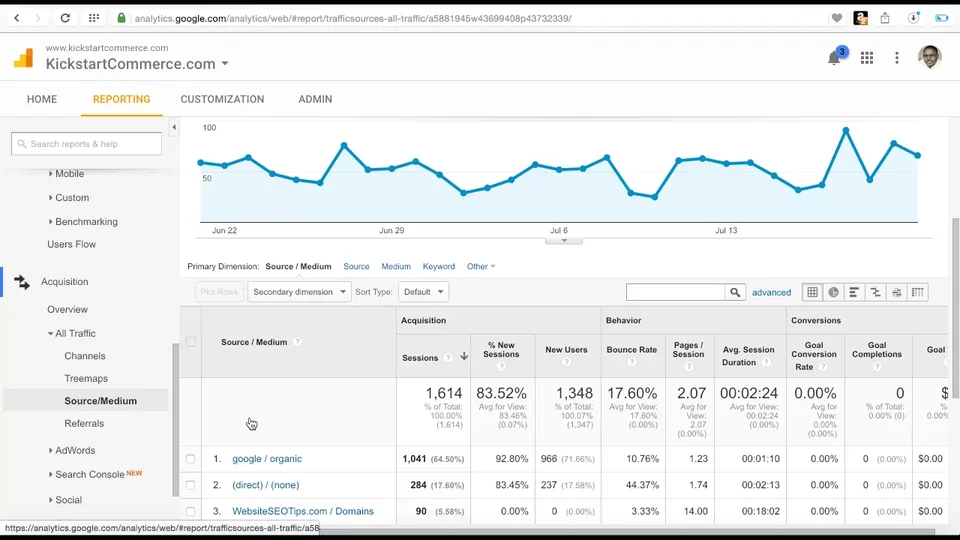
The 2016 tutorial below illustrates adding campaign tags to a domain forwarding target. Its analytics interface and product details are historical; use current vendor documentation for present-day configuration. It does not prove that your own redirect preserves an incoming query string.

How do you test without mistaking a route for a result?
Use the same test route before and after a fix, note the time and the device, and identify which address first changed. A successful page load proves that the browser reached a page; it does not prove a purchase, attributed revenue or a causal improvement.
The mobile QA checklist helps record the browser and market conditions. When comparing variants, the A/B testing guide separates assignment and outcomes. Fix a broken route first; do not interpret a tracking failure as a winning creative.
When is the issue ready to hand back?
Hand the developer a concise record: sanitized starting address, expected fields, first differing hop, the device and market, and whether the behavior was reproduced. Include the final product destination if it is part of the journey. Describe collection separately as verified, failed or not checked.
After the change, repeat the route with the same dummy values. A passing route is evidence for that route at that time, not a guarantee for every device, market or future campaign. Recheck after a redirect, hostname, localization rule or product-link change.
A retained UTM label does not prove continuity across the handoff
Separate the campaign label you can see in a destination URL from the measurement sequence you are trying to interpret. A redirect can preserve a parameter while the next site uses a different reporting scope. Conversely, an expected outbound-click event may be absent under a cross-domain setup: Google’s enhanced-measurement documentation explicitly excludes configured cross-domain destinations from its outbound-click behavior.4 Check the actual configuration rather than inferring continuity from the URL alone.
For a fictional route review, record the presell URL, the intermediate destination if observed and the final product state, using campaign labels without personal information. Note where the label changed and which response or navigation step you actually inspected. A URL observation supports that part of the route; it does not by itself identify a person across domains, confirm a session boundary or establish that an order was attributed correctly.
The presell exit-rate guide keeps the last measured step, denominator and store handoff separate. Use that note when a campaign label survives but the journey appears to end at the presell. The next check should answer one supported question about the route or setup. Do not add personal identifiers, weaken privacy controls or claim an attribution repair merely because a query string now looks as expected.
| Record | What it supports | What it does not prove |
|---|---|---|
| UTM label visible | Parameter at that URL | Same observed session |
| Outbound event absent | Inspect configured scope | Broken link proven |
| Final product correct | Received state in the test | Attributed order proven |
Frequently asked questions
Do all redirects remove UTM parameters?
No. The outcome depends on the destination and redirect rule. Follow the actual requests and note the first changed query string.
Should a product page always repeat the original UTM?
Not necessarily. Whether the parameter needs to appear there depends on the implemented measurement design. Inspect the route and collection separately.
Does a UTM value prove a conversion was tracked?
No. The value in an address does not establish that an event was sent, accepted, attributed or converted into a purchase.
Is a cross-domain linker the same as a UTM?
No. A campaign UTM describes campaign information; a documented linker may help associate a session across configured domains. Their behavior must be verified independently.
Can I use a real customer URL for the test?
Use a controlled route with nonpersonal dummy values. Remove tokens and identifiers before sharing a diagnostic record.
Can a passing test guarantee every visitor is measured?
No. It documents the tested route and conditions. Different browsers, markets, consent choices or later configuration changes may behave differently.
Sources
- URL builders: collect campaign data with custom URLs, Google Analytics Help (Accessed October 27, 2026)
- Set up cross-domain measurement, Google Analytics Help (Accessed October 27, 2026)
- Learn about final URLs and tracking templates, Google Ads Help (Accessed October 27, 2026)
- Enhanced measurement events, Google Analytics Help